FishBeacon Measuring Card
Lay this 8.9 × 5.1 cm card flat on your catch and take the photo. FishBeacon finds the two black square markers on its own, corrects for the camera angle and measures the fish with two taps: nose and tail.
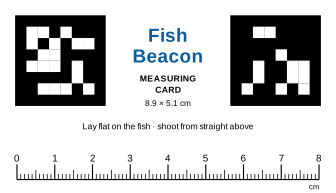 ⬇️ Download card artwork (SVG)
Printing it
- In the print dialog set the scale to 100% / Actual size, not "Fit to page".
- Check one card with a real ruler: the printed scale should read exactly 8 cm. If it doesn't, your printer scaled the page and measurements will be off by the same amount.
- Use card stock if you can, cut along the dashed lines, and seal it with matte laminate or clear tape. Glossy plastic shines in the sun and hides the markers.
For a tougher card, send the SVG to a print shop as a standard business card (3.5 × 2 in / 89 × 51 mm), black and blue on white, no bleed needed, no scaling.
Taking a good photo
- Lay the card flat on the fish's side, not on the deck beside it. It has to be the same distance from the camera as the fish.
- Shoot from as straight above as you can and fit the whole fish, nose to tail, in the frame.
- Keep both black squares fully visible: no fingers, slime or glare over them.
- Don't draw on or cut the black squares. The white border around them matters too.